Hierarchical Event Count module
Source:vignettes/hierarchical_count_table.Rmd
hierarchical_count_table.RmdThis guide provides a detailed overview of the
dv.tables::mod_hierarchical_count_table() module and its
features. It is meant to provide guidance to App Creators on creating
Apps in DaVinci using the module. Walk-throughs for sample app creation
using the module are also included to demonstrate the various module
specific features.
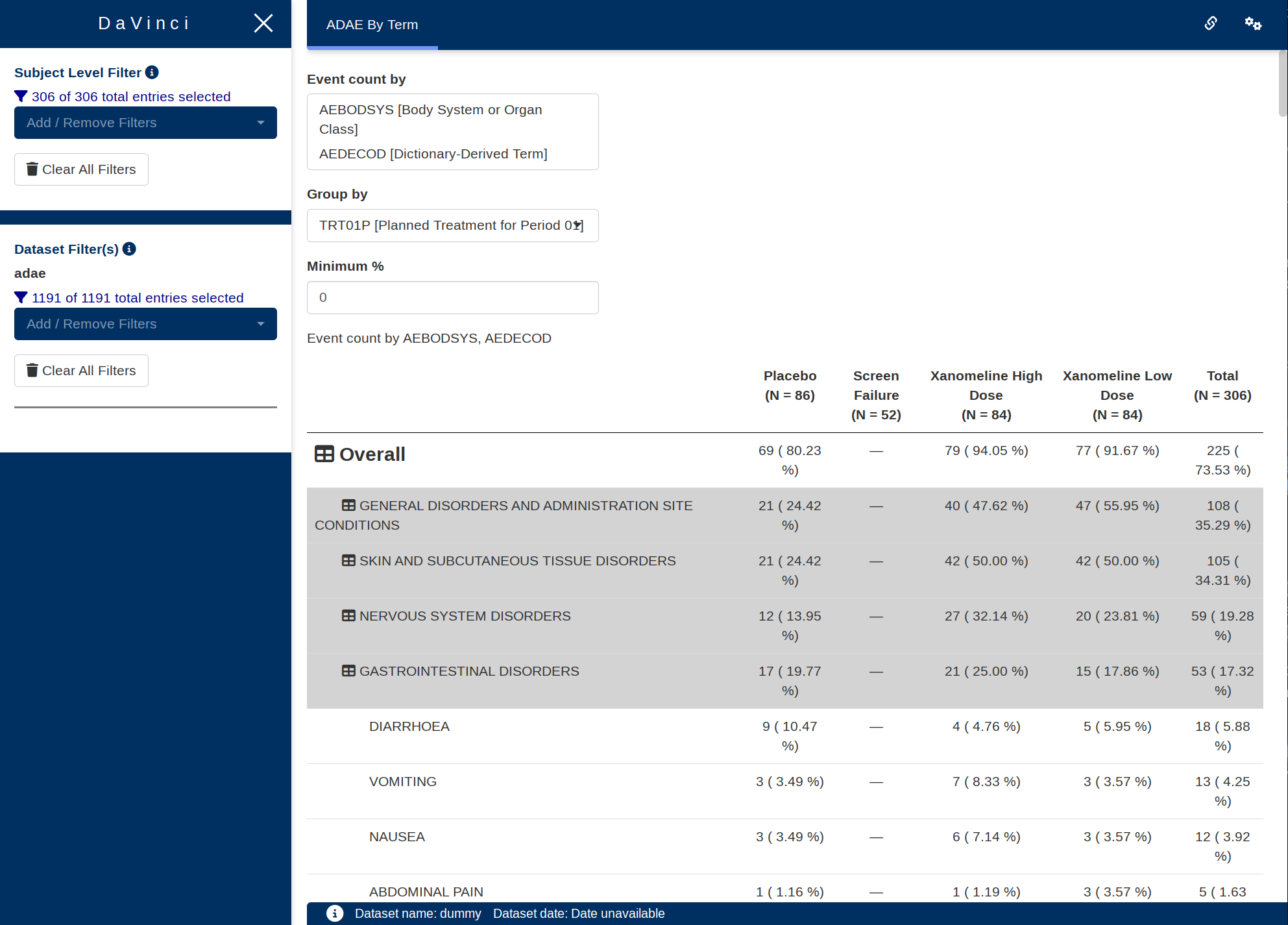
The module makes it possible to visualize a hierarchy table with event counts for each of the levels, with the option of showing time at risk and incidence rates.
Features
- Up to four levels of hierarchy, and a top-level summary of participants with any event.
- Hierarchy levels can be collapsed to only show higher levels. If the highest hierarchy level is collapsed then only the participants with any event top-level summary is shown.
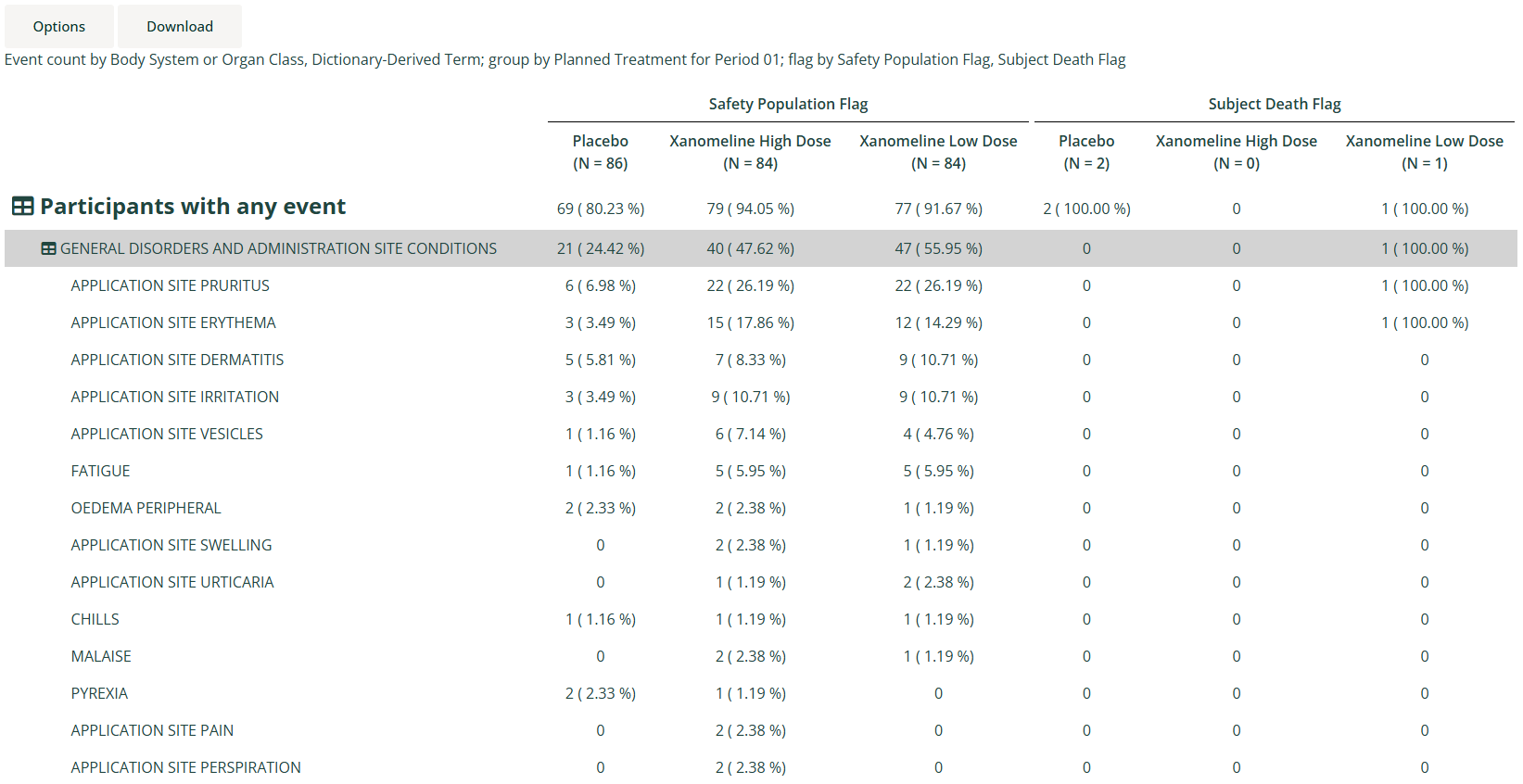
- Up to two levels of grouping by population dataset variables define the columns of the summary table, with group population size (N) displayed for each column. A special grouping level derived from one or more population flagging variables can also be used.
- An optional “Total” group can be derived and displayed for the last population grouping level.
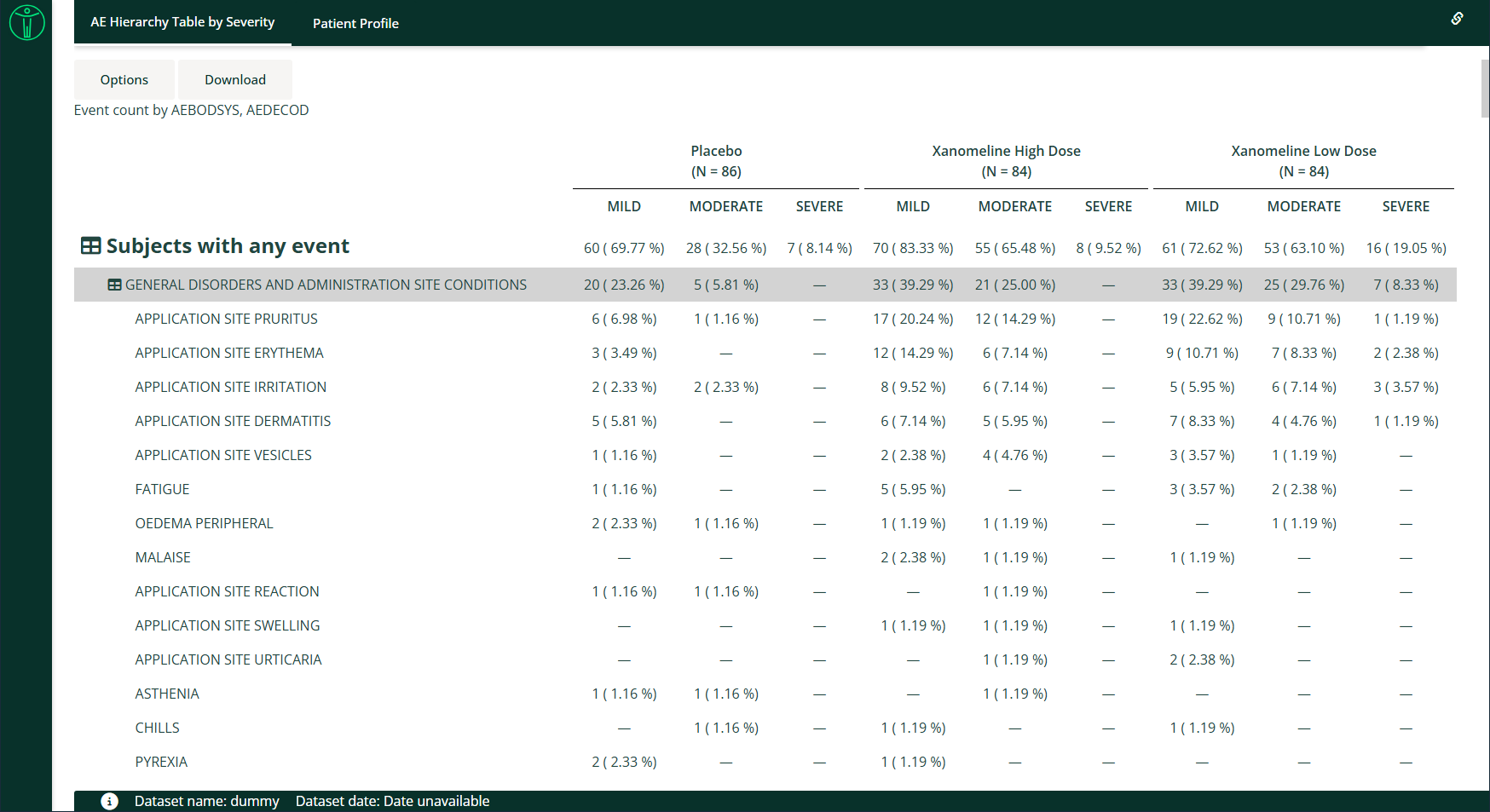
- Optionally apply sub-grouping by a variable from the events data (e.g. event severity).
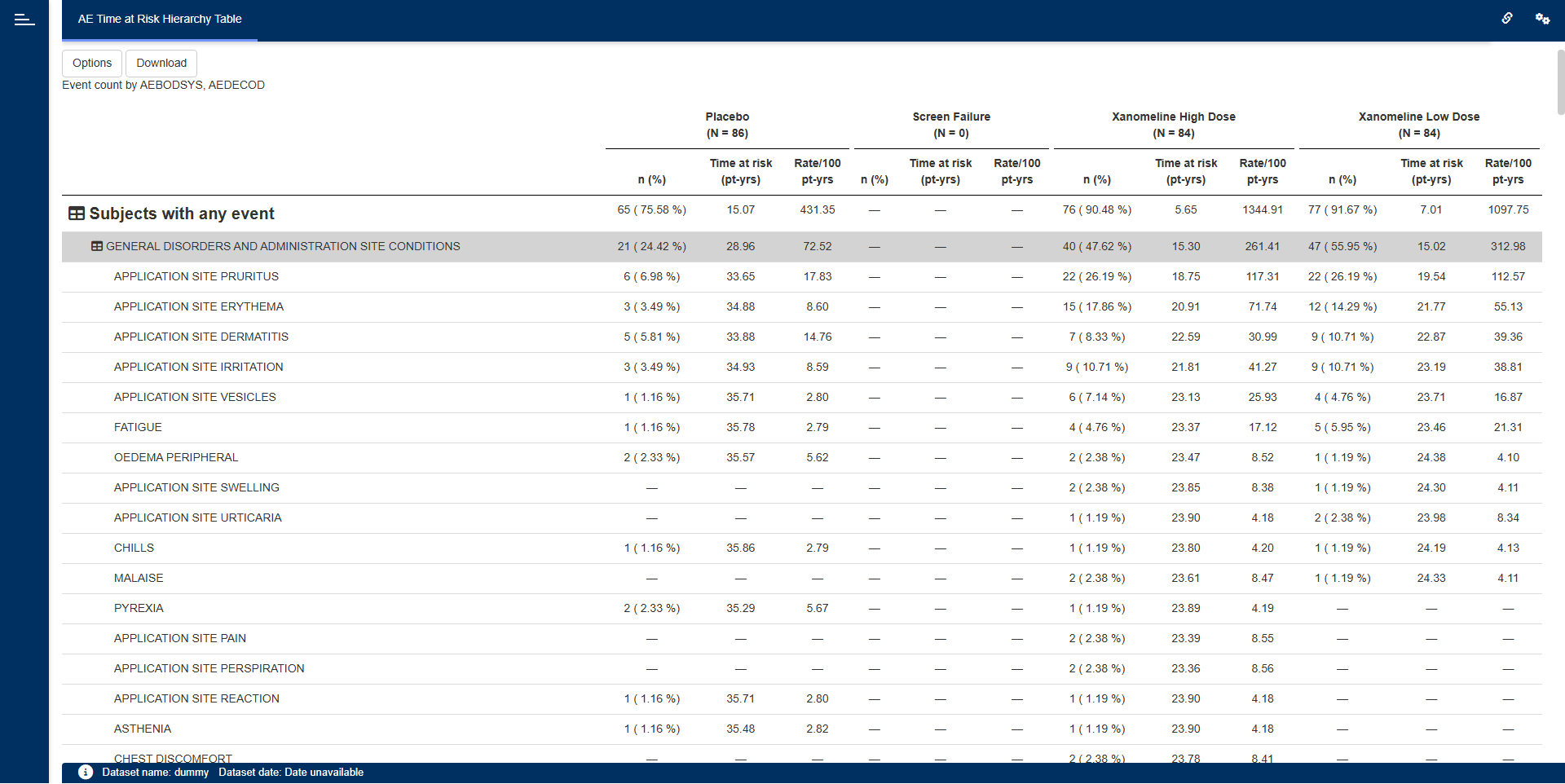
- Event counts and percentages are displayed, and optionally time at risk and incidence rates can be displayed.
- Events within the hierarchy ordered by descending event count (totalled across all groups).
- Tables can be downloaded as Excel (.xlsx) or Word (.rtf).
- It supports bookmarking.
Arguments for the module
The dv.tables::mod_hierarchical_count_table() module
uses several mandatory arguments with the rest of the arguments
defaulted or optional. As part of app creation, the app creator should
specify the values for all mandatory arguments, and values for any other
arguments as applicable.
Mandatory Arguments
-
module_id: A unique identifier of type character for the module in the app. -
table_dataset_name: The name of the dataset that contains the events per row, e.g.,"ADAE". -
pop_dataset_name: The name of the dataset that contains one row per participant in the total population, e.g.,"ADSL". It expects a one-record-per-participant dataset at least containingsubjid_var, with a structure similar to https://www.cdisc.org/kb/examples/adam-subject-level-analysis-adsl-dataset-80283806
Please refer to
dv.tables::mod_hierarchical_count_table() for the complete
list of arguments and their description.
Input menus
A drop-down “Options” menu provides the following inputs:
-
Event count by: Selection of one to four levels of
hierarchy variables from the table (events) dataset, to be displayed
down the left side of the table, e.g.
AEBODSYS,AEDECOD. -
Group by: Selection of a grouping variable from the
participant-level population dataset, to be displayed across the top of
the table, e.g.
TRT01P. -
Minimum %: The minimum percentage threshold for
filtering events. Each displayed group cell whose percentage of
participants is below this threshold has its event count and percentage
replaced with a dash (—). Defaults to
0. - Remove rows under minimum %: Checkbox that controls whether to remove entire rows (across all hierarchy levels) for which every group’s percentage of participants falls below the Minimum % threshold, instead of just showing a dash for those cells.
- Total: Checkbox that controls whether or not to display a “Total” column totalling data from all group categories.
The following input will also be available in the “Options” menu when
the show_pop_flag_selection module argument is set to
TRUE:
Population flags: Selection of one or more flagging variables from the population dataset, to be displayed across the top of the table. The flags are subsetting on
"Y"values.-
Move after grouping variables: Checkbox that controls whether the flags should be moved to after (below) the grouping variables. Otherwise, they will appear before (above) the grouping variables.
The following input will also be available in the “Options” menu when the
show_event_group_bymodule argument is set toTRUE: Event group by: Selection of a sub-grouping variable from the table (events) dataset, to be displayed across the top of the table under the main grouping, e.g.
AESEV.
The following inputs will also be available in the “Options” menu
when the show_time_at_risk_options module argument is set
to TRUE:
-
Event Date: A “Date” class
(e.g.
ASTDT) from the table events dataset. Events with missing dates will be excluded from the analysis. -
Origin Date: A “Date” class
(e.g.
RANDDT) from the participant-level population dataset. Events occurring before origin date will be excluded from the analysis. -
Censor Date: A “Date” class
(e.g.
EOSDT) from the participant-level population dataset. Events occurring after censor date will be excluded from the analysis. - Time at Risk: Checkbox that controls whether or not to display time at risk and incidence rate columns. If a participant has a missing origin or censor date, time at risk cannot be calculated and the participant will be excluded from the population count. Note that even if the checkbox is unchecked, events will still be selected based on event, origin and censor dates, but population count will not be affected.
Note that if event group-by has been specified
(show_event_group_by module argument set to TRUE) then
time-at-risk options are not available.
When smq_vars is supplied, the module derives an SMQ
hierarchy from those columns. If udaec_list is also
supplied, it can derive UDAEC categories from SMQ variables and
preferred-term definitions. When an SMQ or UDAEC hierarchy is selected,
an additional menu allows users to filter the displayed categories.
SMQ and UDAEC hierarchies
The smq_vars argument is a character vector of
event-dataset column names that contain SMQ indicators or categories.
The module derives an SMQ hierarchy variable from these
columns. The name of the derived variable can be changed with
smq_name, which defaults to "SMQ".
The optional udaec_list argument defines UDAEC
categories as a named list. Each list name becomes a UDAEC category
label, and each corresponding element must be a list containing at least
one of the following definitions: Only smq_vars,
pt_var, and pt_values are valid entries in a
category definition.
-
smq_vars: A character vector of SMQ source column names. These names must also be included in the top-levelsmq_varsargument. -
pt_varandpt_values: The event-dataset column containing preferred terms and an atomic vector of values identifying the preferred terms assigned to the category.pt_varmust exist in the event dataset, and both fields must be supplied together.
A UDAEC category can use either definition or both definitions. For example, the following configuration assigns SMQ source columns and selected preferred terms to two UDAEC categories:
udaec_list <- list(
  "Cardiac disorders" = list(
    smq_vars = "SMQ_CARDIAC",
    pt_var = "AEDECOD",
    pt_values = c("Atrial fibrillation", "Myocardial infarction")
  ),
  "Renal disorders" = list(
    smq_vars = c("SMQ_RENAL", "SMQ_KIDNEY"),
    pt_var = "AEDECOD",
    pt_values = c("Acute kidney injury", "Renal impairment")
  ),
  "Selected neurological terms" = list(
    pt_var = "AEDECOD",
    pt_values = c("Seizure", "Headache")
  )
)
The corresponding module configuration must include every SMQ source
column referenced inside udaec_list in the top-level
smq_vars argument:
dv.tables::mod_hierarchical_count_table(
  module_id = "ae_hierarchy",
  table_dataset_name = "adae",
  pop_dataset_name = "adsl",
  smq_vars = c("SMQ_CARDIAC", "SMQ_RENAL", "SMQ_KIDNEY"),
  udaec_name = "UDAEC",
  udaec_list = udaec_list
)
udaec_list requires a non-NULL top-level
smq_vars, even when a category is defined only with
preferred terms. The preferred-term column, such as
AEDECOD, must exist in the event dataset. Once
SMQ or UDAEC is selected as a hierarchy, the
module displays an additional category filter in the Options menu.
Visualizations
Sub-grouped Hierarchical Event Count table
A collapsible hierarchy table sub-grouped by a variable from the table events dataset.
Creating a hierarchical count table application
Example 1
The following code specifies the bare minimum module arguments with no default hierarchy or group specified:
requireNamespace("pharmaverseadam")
requireNamespace("dv.manager")

dv.manager::run_app(
  data = list(dummy = list(adsl = pharmaverseadam::adsl,
                           adae = pharmaverseadam::adae)),
  module_list = list(
    "AE Hierarchy Table" = dv.tables::mod_hierarchical_count_table(
      module_id = "hierarchical_count_table",
      table_dataset_name = "adae",
      pop_dataset_name = "adsl"
    )
  ),
  filter_dataset_name = "adsl",
  filter_key = "USUBJID"
)
Example 2
The following code specifies module arguments for the display of a body system and preferred term hierarchy grouped by planned treatment group, and event severity:
requireNamespace("pharmaverseadam")
requireNamespace("dv.manager")

dv.manager::run_app(
  data = list(dummy = list(adsl = pharmaverseadam::adsl,
                           adae = pharmaverseadam::adae)),
  module_list = list(
    "AE Hierarchy Table by Severity" = dv.tables::mod_hierarchical_count_table(
      module_id = "hierarchical_count_table",
      table_dataset_name = "adae",
      pop_dataset_name = "adsl",
      show_event_group_by = TRUE,
      default_hierarchy = c("AEBODSYS", "AEDECOD"),
      default_group = "TRT01P",
      default_event_group = "AESEV",
      default_total = FALSE,
      event_group_choices = c("AESEV", "AETOXGR")
    )
  ),
  filter_dataset_name = "adsl",
  filter_key = "USUBJID"
)
Example 3
The following code specifies module arguments for the display of a body system and preferred term hierarchy and planned treatment group, with date variables specified for time at risk and incidence rate analysis:
requireNamespace("pharmaverseadam")
requireNamespace("dv.manager")

dv.manager::run_app(
  data = list(dummy = list(adsl = pharmaverseadam::adsl,
                           adae = pharmaverseadam::adae)),
  module_list = list(
    "AE Time at Risk Hierarchy Table" = dv.tables::mod_hierarchical_count_table(
      module_id = "hierarchical_count_table",
      table_dataset_name = "adae",
      pop_dataset_name = "adsl",
      show_time_at_risk_options = TRUE,
      default_hierarchy = c("AEBODSYS", "AEDECOD"),
      default_group = "TRT01P",
      default_event_date = "ASTDT",
      default_origin_date = "TRTSDT",
      default_censor_date = "EOSDT",
      default_total = FALSE,
      default_risk = TRUE
    )
  ),
  filter_dataset_name = "adsl",
  filter_key = "USUBJID"
)
Download
This module allows downloading the table as Excel (.xlsx) or Word (.rtf).
In the downloaded table, overall number of participants
(N = seen in the selected group’s column header) is shown
in the first row below the column names.
Additionally, if the option to split count and percent into separate
columns is selected, then selected group variable’s metrics is split
into two columns for every group item, {group item} [N] to
show count value and {group item} [%] to show relative
percentage.